
Photo Credit: Instagram

Instagram now lets users rearrange posts on their profile grid.
The feature helps users highlight important content and refresh their profile aesthetic.
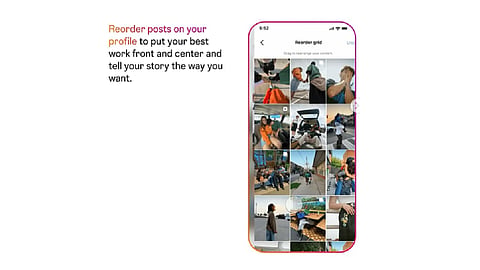
Users can simply tap, drag, and drop posts to reorder their grid.
Meta-owned Instagram recently announced the Instagram Plus subscription globally, and now it has introduced a new feature -- Reorder Your Grid. With this feature, users can reorder Instagram posts and simply reorganise posts on their profile grid. Notably, the new feature makes it easier for users to showcase important posts and refresh the overall aesthetic. Here's more about the newly announced feature.

Instagram's new "Reorder Your Grid" feature lets users rearrange posts on their profile.
Photo Credit: Instagram
According to the @creators account on Instagram, the new "Reorder Your Grid" feature gives users greater control over how their profile appears.
It says users can move any post to any position on their profile grid to better match their creative vision, showcase their best work, or simply refresh the look of their profile.
The page also notes that first impressions matter, as the profile grid is often the first thing people notice.
With this Instagram profile grid update, users can curate their profiles to reflect who they are at the moment, whether they are highlighting creative projects, promoting products, or making their profile feel more personal.
Additionally, the feature is designed to be simple and flexible, allowing users to reorder posts through an intuitive tap, drag-and-drop interface and update their grid as often as they like.
Instagram introduces the "Reorder Your Grid" feature for profile customisation
Open the Instagram app and go to your profile.
Tap and hold any post on your profile grid.
Select "Reorder Grid" from the pop-up menu.
Drag and drop posts to rearrange them in your preferred order.
The changes are saved instantly and will be visible to anyone visiting your profile.
The Reorder Your Grid feature comes on the heels of Instagram Plus, which recently allowed users to pin up to six posts on their profiles.
Instagram Plus also brings several other features aimed at enhancing the user experience, including Story Spotlight, which places Stories at the top of friends' feeds for better visibility.
Meanwhile, subscribers also get Super Hearts and Multiple Story Audiences for more personalised sharing, as well as Story Extend, which lets Stories remain visible for up to 48 hours.
Subscribers also get Story Preview for anonymous viewing, Story Rewatch Insights, and a Search Viewer List to quickly check who has viewed their Stories.
Other customisation features include Custom App Icons, Custom Bio Fonts, support for up to six profile pins, and the ability to post directly to the profile or Highlights without the content appearing in followers' feeds.
What is Instagram's Reorder Your Grid feature?
Instagram's "Reorder Your Grid" feature allows users to change the arrangement of posts on their profile grid without affecting the original posting date. It gives users more flexibility to curate how their profiles appear to visitors.
How can users rearrange posts on their Instagram profile?
Users can go to their profile, tap and hold any post, select "Reorder Grid" from the pop-up menu, and then drag and drop posts into their preferred positions. The changes are saved instantly.
Does reordering the grid affect post engagement?
No. The feature only changes how posts are displayed on the profile grid. It does not alter the original upload date, likes, comments, shares, or other engagement metrics.
Can users reorder all Instagram posts or only selected ones?
Users can move any eligible post to a different position on their profile grid and rearrange multiple posts as they wish. Instagram has not indicated any limitations on the number of posts that can be reordered.
Why did Instagram introduce the Reorder Your Grid feature?
According to Instagram, the feature was introduced to give users greater control over their profiles. It allows creators and everyday users alike to showcase their best content, reflect their creative vision, and make stronger first impressions through a more personalised grid layout.
At marvelof.com, we spotlight the latest trends and products to keep you informed and inspired. Our coverage is editorial, not an endorsement to purchase. If you choose to shop through links in this article, whether on Amazon, Flipkart, or Myntra, marvelof.com may earn a small commission at no extra cost to you.