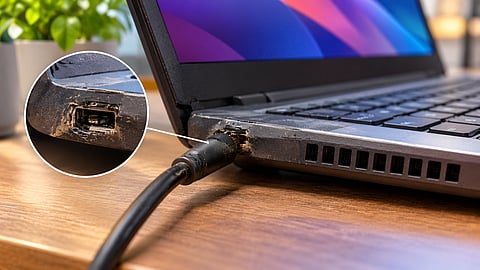

A damaged laptop charging port can cause intermittent power delivery and further hardware damage.
Photo Credit: AI-Generated

A damaged charging port can cause intermittent charging, unstable power and excessive heat.
Repeatedly forcing a loose charging cable can worsen the port or damage motherboard connections.
Stop using the connection if you notice sparks, burning smells or unusual heat, and get the laptop inspected.
A damaged laptop charging port can cause more than inconvenience. If the connection becomes loose or unreliable, the laptop may stop charging intermittently, switch between battery and external power, or fail to recognise the charger altogether. In some cases, a poor electrical connection can also generate heat and damage the charging circuitry.
The problem may not seem serious initially as a laptop might continue charging if you hold the cable at a particular angle or adjust its position. However, repeatedly forcing the connection can worsen the physical damage and make repairs more complicated.
The extent of the problem depends on the type of damage, the laptop's charging-port design and whether the motherboard or nearby components have been affected. Here's what can happen if you continue using a laptop with a damaged charging port, the warning signs to watch for and when to get it repaired.
A damaged charging port can affect how consistently power reaches the laptop. Depending on the nature of the fault, you may experience one or more of the following problems:
Intermittent charging: The laptop may stop charging when the cable moves, or the battery indicator may switch between charging and discharging.
Unstable power connection: The laptop may fail to recognise the charger consistently, even when the adapter and cable are working properly.
Excessive heat: A poor electrical connection can increase resistance at the contact point, potentially causing the port or connector to heat up.
Further hardware damage: Repeated movement can worsen loose connections, damage solder joints or affect the surrounding motherboard circuitry.
Complete charging failure: If the connection deteriorates further, the laptop may eventually stop receiving power through that port.
According to Asurion, a device repair company, common signs of a damaged charging port include a loose connector, inconsistent charging and a connection that works only when the cable is held at a particular angle.
The severity of these problems varies. A loose external connector does not necessarily mean the motherboard is damaged, but continued use without diagnosis can make the fault worse.
A charging port may show signs of physical damage before it stops working completely. Watch for these symptoms:
These symptoms do not always confirm that the charging port is faulty. A damaged adapter, cable or battery can cause similar problems. Testing with a compatible, known-good charger can help narrow down the issue, but a technician may need to inspect the port and charging circuitry to confirm the cause.
Discussions on Reddit show how some users continue using laptops with loose charging ports, often by adjusting the cable until the connection works. While this may seem like a temporary workaround, it can make an existing hardware problem worse.
In a Reddit's r/techsupport discussion about a loose laptop charging port, one user described the problem: "The charger only works if I hold it at a weird angle. If I let go it stops charging. I've been doing this for a couple of weeks".
Another commenter warned against continuing this practice, pointing to the possibility of electrical arcing and heat from an intermittent connection.
A similar concern appeared in a r/laptops discussion about a loose charging port. A user who had been adjusting the cable for months asked whether this could cause further damage. The discussion highlighted the risk of repeatedly putting mechanical stress on an already loose port.
These experiences illustrate why a charging connection that works only at a particular angle should not be treated as a minor inconvenience. Reddit discussions are anecdotal rather than technical diagnosis, but they offer useful context about how users encounter and deal with this problem.
Yes, depending on the type and extent of damage.
Many laptop charging ports are connected to the motherboard through soldered joints. If the port becomes loose, repeated movement can put stress on these joints and the surrounding circuit board. Over time, this may cause cracked solder connections or damage to the electrical contacts.
A poor electrical connection can also generate heat and, in certain circumstances, electrical arcing. This can damage the port and nearby circuitry. However, motherboard damage is not inevitable every time a charging port becomes loose.
The repair required also depends on the laptop's design. Some models have a separate DC-in jack connected to the motherboard through a cable, making replacement relatively straightforward. Others use a charging port soldered directly onto the motherboard, which may require specialised repair work.
In a Spiceworks community discussion (an IT community forum), users described cases where loose charging ports required repair or motherboard replacement. These experiences illustrate why identifying the problem early matters, although the repair requirements vary by laptop model.
If your laptop charges only when the cable is held at a particular angle, forcing it into position is not a reliable workaround.
Repeatedly adjusting or pushing the connector can put additional mechanical stress on the port. It may worsen damaged contacts, loosen the internal connection or affect solder joints. Using tape to hold the cable in place does not repair the electrical connection either.
Avoid inserting metal objects into the charging port or bending the cable to maintain contact. These improvised fixes can cause further physical damage or create an electrical short.
The same caution applies to USB-C charging ports. Although USB-C connectors are designed to support repeated connections, a damaged port or connector can still cause intermittent charging and electrical problems.
If the port is unusually hot, produces sparks, shows burn marks or gives off a burning smell, disconnect the charger if it is safe to do so. Stop using that charging connection and have the laptop inspected. Do not continue testing it with different cables.
If you suspect charging-port damage, take the following steps:
Stop forcing the connection: Do not keep adjusting the cable or holding it at an angle to make charging work.
Check the charger and cable: Inspect them for visible damage. If there are no signs of electrical damage, a compatible, known-good charger can help establish whether the adapter is the problem.
Back up important files: If the laptop is still working normally and there are no signs of overheating, burning or electrical damage, back up important data before taking it for repair.
Get the charging port inspected: A technician can check whether the problem is limited to the port or involves the charging cable, battery or motherboard.
Avoid DIY repairs unless qualified: Replacing a soldered charging port requires appropriate tools and repair skills. Attempting it without experience can cause additional damage.
If the laptop is overheating around the port, producing sparks or showing signs of burning, do not continue using it to back up files. Disconnect the power source if safe and arrange a professional inspection.
It depends on the symptoms and the nature of the damage. A minor physical issue does not necessarily mean the laptop is at immediate risk, but an intermittent connection should not be ignored.
If the laptop charges inconsistently, stop relying on the damaged connection and arrange an inspection. If you notice excessive heat, sparks, a burning smell or visible burn marks, stop using the charger immediately.
A damaged charging port is generally easier to address before the fault affects other components. Getting it inspected early can help prevent a relatively contained repair from becoming a more complicated motherboard issue.
Can I continue using a laptop with a loose charging port?
It is not advisable to continue using it without getting the problem checked. A loose connection can worsen with repeated movement and may cause intermittent charging or damage to the port and surrounding circuitry.
Can a damaged charging port affect laptop battery health?
A damaged port does not automatically reduce battery health. However, unreliable charging can interrupt normal charging, while an electrical fault that causes excessive heat may create additional risks for nearby components.
How do I know whether my laptop charging port or charger is faulty?
Check the charger and cable for visible damage and, if safe, test with a compatible, known-good charger. If the laptop still charges intermittently, the port or internal charging circuitry may need inspection.
Can a laptop charging port be repaired without replacing the motherboard?
In many cases, yes. Some laptops have replaceable charging jacks, while others require soldering work. If the motherboard or charging circuitry is damaged, a more extensive repair may be necessary.
Is a loose USB-C charging port dangerous?
A loose USB-C port can cause intermittent charging and may worsen with repeated movement. Stop using it if it becomes unusually hot, produces sparks or shows visible damage, and arrange a professional inspection.
Disclaimer: Charging-port damage and repair requirements vary by laptop model. Stop using a port that shows signs of overheating or electrical damage and consult a qualified technician.
At marvelof.com, we spotlight the latest trends and products to keep you informed and inspired. Our coverage is editorial, not an endorsement to purchase. If you choose to shop through links in this article, whether on Amazon, Flipkart, or Myntra, marvelof.com may earn a small commission at no extra cost to you.


